


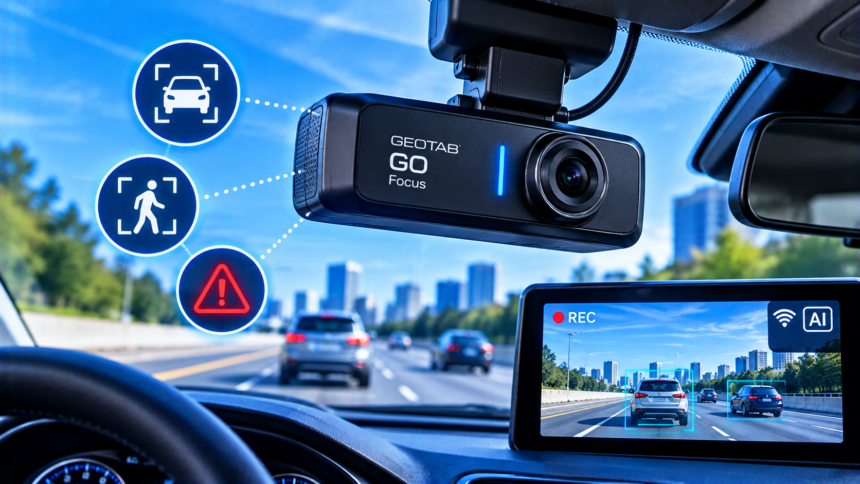
The Geotab GO Focus AI dash camera is a road-facing camera built for commercial fleets that want useful safety evidence without recording drivers inside the cab. It connects with Geotab’s fleet platform, where authorized managers can review event footage alongside vehicle data. If you are considering the camera “with a plan,” confirm the hardware price, recurring service fees, device compatibility, and included features with a Geotab reseller before ordering. Pricing and package details can vary by account and region.
- What is the Geotab GO Focus AI dash camera?
- How does GO Focus work with a plan?
- What safety features does GO Focus offer?
- How does the camera protect driver privacy?
- What equipment and compatibility do you need?
- What does the Geotab GO Focus camera and plan cost?
- What are the main benefits and limitations?
- How do you decide if GO Focus is right for your fleet?
- Conclusion
- Frequently asked questions
- Does Geotab GO Focus require a subscription?
- Is Geotab GO Focus compatible with GO8?
- Does GO Focus record the driver inside the cab?
- What is the difference between GO Focus and GO Focus Plus?
- How much does the Geotab GO Focus AI dash camera cost?
- Related Articles
What is the Geotab GO Focus AI dash camera?
Geotab GO Focus is an AI-powered, forward-facing dash camera designed to add visual context to fleet telematics. It can help a fleet understand what happened around a safety event, rather than relying only on vehicle data or a driver’s account.
The camera is aimed at businesses operating vans, trucks, service vehicles, and other fleet vehicles. Its main role is to identify selected road risks and record relevant footage. The video and data work with MyGeotab, Geotab’s fleet management platform, so authorized users can review incidents in the same general workflow they use for vehicle information.
GO Focus is different from a basic consumer dash cam. It is part of a fleet safety system, so the value comes from combining event video with vehicle context, safety analysis, and follow-up. It is not designed to replace attentive driving or take control of the vehicle.
How does GO Focus work with a plan?
The camera is best understood as a hardware-and-service solution, not just a device you buy and use on its own. The camera connects with a compatible Geotab GO telematics device and uses Geotab’s platform to make relevant safety information available to fleet users.
A plan or commercial package may cover different items depending on the provider and agreement. Before you sign, ask for a written breakdown of:
- The one-time cost of the camera and any required cables or accessories.
- The recurring subscription or service charge per vehicle.
- Whether the plan includes connectivity, video access, data storage, and platform features.
- Any separate MyGeotab or telematics fees that apply to your fleet.
- The contract length, renewal terms, cancellation rules, and any minimum vehicle count.
- Installation costs, replacement terms, and support availability.
Do not assume every offer includes the same services. Ask the reseller to identify the exact GO Focus model, the required telematics device, and the features enabled under your account. If you already use Geotab, ask whether the camera can be added to your current setup and what incremental monthly cost will apply.
Geotab provides product information on its official GO Focus product page. Use that page to understand the product, then request a quote that matches your fleet size and location.
What safety features does GO Focus offer?
GO Focus combines forward-facing video with AI-based safety detection. Geotab describes features including continuous measurement of following distance and event-driven recording. This can help a safety team identify situations such as tailgating and review footage related to a collision or other supported event.
The system is intended to provide context and insight. A manager may be able to review an event, understand what was happening on the road, and use the information to guide a driver conversation or improve a safety policy. Video can also help establish the circumstances around an incident, although it does not automatically determine legal fault or guarantee an insurance outcome.
Some features may depend on the model, configuration, region, or software release. For example, Geotab’s support documentation lists lane departure warning as a feature planned for later in 2026. Confirm current availability with the provider rather than assuming every advertised or planned capability is already enabled for your account.
It is also useful to separate GO Focus from GO Focus Plus. GO Focus is a road-facing-only option built around event-specific road footage and privacy. GO Focus Plus offers broader detection and in-cab voice alerts for certain risky behaviors. If you need real-time verbal coaching or driver-monitoring functions, ask specifically about GO Focus Plus rather than treating the two models as interchangeable.
How does the camera protect driver privacy?
GO Focus is designed around road-facing recording. It records footage during specific key driving events instead of continuously streaming video from inside the vehicle. The product does not use an in-cab camera or microphone, which may make it a better fit for fleets that want visual evidence while limiting direct monitoring of drivers.
Geotab says the device processes data locally and encrypts it to help limit exposure. Access to event footage is controlled through the fleet platform. These safeguards can support a more privacy-conscious safety program, but they do not remove the need for clear company policies.
Before rollout, explain to drivers what the camera records, which events can trigger recording, who can view the footage, and how the company will use it. Define retention and access rules, and check the employment, privacy, and recording laws that apply where your vehicles operate. Requirements may differ between jurisdictions and between company-owned and privately used vehicles.
Privacy also depends on how the fleet configures and manages the system. Limit video access to staff who need it, document the purpose of reviews, and use a consistent process when an event is flagged. Clear rules can help drivers understand that the system is intended to support safety and incident review, not unrestricted surveillance.
What equipment and compatibility do you need?
Compatibility is one of the first things to check before purchasing. Geotab’s support documentation states that GO Focus works with GO9 and newer Geotab GO devices. It is not compatible with GO8 or earlier devices.
That means a fleet with older telematics hardware may need an upgrade before it can install the camera. Do not rely only on the vehicle’s make, model, or year to judge compatibility. Confirm the exact GO device currently installed in each vehicle and whether the proposed camera kit includes the cables or connections required for that setup.
Review the official GO Focus overview and compatibility details with your installer or reseller. Also ask about installation time, camera placement, calibration, cellular coverage, and any requirements for vehicles that operate in harsh conditions.
For a mixed fleet, build a vehicle-by-vehicle list before requesting a final quote. Record each vehicle’s existing telematics device, location, intended use, and any special installation needs. This can prevent surprise costs after the order is placed.
What does the Geotab GO Focus camera and plan cost?
There is no single public price that should be assumed for every Geotab GO Focus installation. The total can depend on the reseller, region, number of vehicles, hardware bundle, existing Geotab services, and contract terms. A quote should separate the initial hardware and installation costs from ongoing service charges.
Ask the provider to show the cost per vehicle and the total cost for your planned fleet size. If you are comparing a one-year and a multi-year agreement, request the full contract value rather than comparing only the monthly payment. Also ask whether taxes, shipping, installation, replacement hardware, and support are included.
A simple comparison table can help you evaluate offers:
| Cost item | What to confirm |
| Camera hardware | Exact model and included accessories |
| Telematics hardware | Whether your current GO device is compatible |
| Monthly service | Per-vehicle fee and what it covers |
| Video and data | Access, connectivity, storage, and retention terms |
| Installation | One-time charge, labor, and calibration |
| Contract | Term, renewal, cancellation, and minimum quantity |
| Support | Troubleshooting, replacements, and response times |
Do not choose a plan based on the lowest monthly figure alone. A low price may exclude installation or require a separate platform service. The best comparison is the full cost over the period you expect to use the system, along with the features your safety team will actually use.
What are the main benefits and limitations?
The main benefit of GO Focus is event-based road visibility that fits into an existing fleet management workflow. It can give managers useful context when reviewing selected safety events, while its road-facing design limits the amount of in-cab monitoring. Fleets already using compatible Geotab devices may also find it easier to keep telematics and camera information in one platform.
Other potential benefits include more structured incident reviews, better-informed coaching discussions, and a clearer record of events around a collision. Results depend on how the fleet uses the footage, how consistently managers follow up, and whether drivers understand the program.
There are also limits to consider. GO Focus is not a full 360-degree camera system, and it does not provide the same driver-facing capabilities as GO Focus Plus. Event-based recording is also different from having continuous, on-demand live video. If your operation needs a live view, in-cab driver monitoring, or coverage around the whole vehicle, compare other models before choosing.
The camera should be one part of a safety plan, not the entire plan. Training, vehicle maintenance, sensible scheduling, clear driving rules, and fair coaching still matter. AI alerts can help draw attention to risk, but a manager should review the context before making decisions about a driver.
How do you decide if GO Focus is right for your fleet?
GO Focus may suit a fleet that wants road-facing evidence for selected events, already uses compatible Geotab telematics, and values privacy-conscious recording. It may be a strong starting point for businesses that want to improve incident review without installing an in-cab camera.
It may be less suitable if you need continuous live video, driver-facing monitoring, immediate in-cab voice alerts, or full vehicle perimeter coverage. In those cases, compare GO Focus Plus or another system with the functions your operation needs. Make sure you are comparing the exact features and not just the product names.
Before committing, work through this short checklist:
- Confirm the GO device in every vehicle is GO9 or newer.
- Decide which risks you want to detect and how managers will respond.
- Ask for a complete quote covering hardware, service, installation, and contract terms.
- Review privacy requirements and communicate the policy to drivers.
- Test the setup with a small group of vehicles if your provider offers a pilot.
- Set success measures, such as event review time, coaching completion, or changes in selected safety behaviors.
A pilot can show whether the alerts and footage fit your real routes and work patterns. Agree on how results will be measured before the trial starts, and avoid promising a specific reduction in collisions or costs without evidence from your own operation.
Conclusion
The Geotab GO Focus AI dash camera with a plan can help commercial fleets review key road events and connect camera evidence with telematics data in MyGeotab. Its road-facing, event-based approach is useful for teams that want safety insights while limiting in-cab recording. Before buying, confirm GO9-or-newer compatibility, enabled features, total monthly and upfront costs, and the privacy rules that apply to your fleet. A clear quote and practical pilot will help you judge whether it fits.
Frequently asked questions
Does Geotab GO Focus require a subscription?
GO Focus is designed to work within Geotab’s fleet telematics and software environment, so you should confirm the recurring service charges needed for your configuration. Ask the reseller to list camera, connectivity, platform, storage, and support fees separately.
Is Geotab GO Focus compatible with GO8?
No. Geotab’s support documentation lists GO9 and newer GO devices as compatible and says GO Focus does not work with GO8 or earlier devices. Check the hardware installed in each vehicle before ordering.
Does GO Focus record the driver inside the cab?
GO Focus is a road-facing camera and does not include an in-cab camera or microphone. It records road footage for specific key driving events rather than continuously streaming video from inside the vehicle.
What is the difference between GO Focus and GO Focus Plus?
GO Focus focuses on road-facing, event-based footage and driver privacy. GO Focus Plus adds broader AI detection and in-cab voice alerts for certain risky behaviors. Choose based on whether your fleet needs road evidence alone or active driver coaching.
How much does the Geotab GO Focus AI dash camera cost?
The total price depends on the reseller, region, fleet size, hardware, existing telematics setup, and service agreement. Request a written quote that separates the camera, installation, recurring service, and any additional platform charges.
Related Articles
Symptoms of a Bad Power Steering Pump: 8 Signs to Know
Does a Turbo Engine Require Premium Gas?