


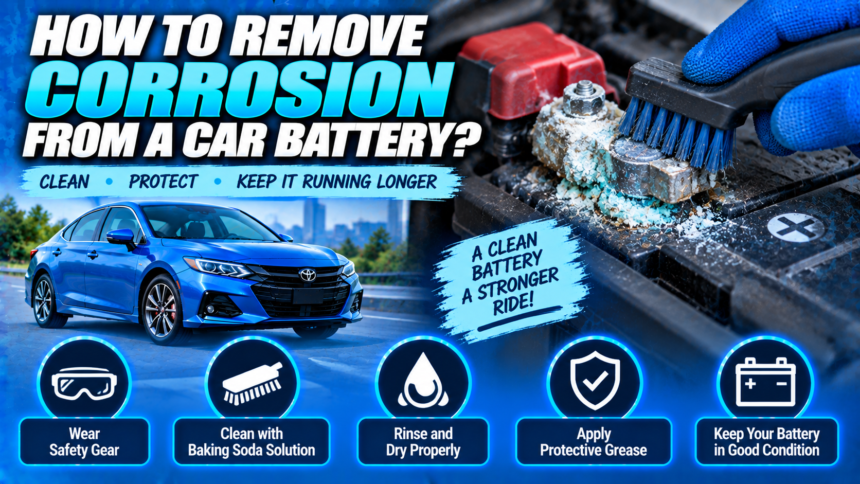
To remove corrosion from a car battery, disconnect the terminals negative first, apply a solution of one tablespoon of baking soda in a cup of water, scrub with a stiff brush once the fizzing stops, rinse, and dry completely. The job takes about twenty minutes and costs almost nothing.
- Why corrosion forms?
- Safety first, briefly
- What you need?
- The cleaning process
- If your battery has side posts
- What the corrosion is telling you?
- Preventing it from coming back
- When corrosion means the battery is done?
- Conclusion
- Frequently asked questions
- What is the white stuff on my car battery terminals?
- Can I clean battery corrosion without disconnecting the terminals?
- Does Coca-Cola clean battery corrosion?
- Is battery corrosion dangerous to touch?
- How do I stop battery corrosion from coming back?
- Related Articles
The part worth knowing before you start: that crusty buildup is acidic residue, so it burns skin and eyes. Gloves and eye protection are not optional here. And once the battery is clean, look at which terminal was corroded, because that tells you whether you have a one-off or a charging system problem that will bring the corrosion straight back.
Why corrosion forms?
A lead-acid battery vents small amounts of hydrogen gas and sulfuric acid vapor, mostly through the tiny gaps where the terminals pass through the plastic case. Those vapors react with the lead posts and copper clamps, and the result is the powdery deposit you can see.
Several things speed this up. Under-hood temperatures can exceed 250°F, and the plastic case and metal posts expand at different rates, which opens those gaps slightly and lets more vapor escape. Humidity accelerates the reaction. Road salt makes it worse still.
Some corrosion on an older battery is normal. Heavy, fast-returning corrosion is not, and that distinction is what the diagnostic section below is for.
Safety first, briefly
Battery corrosion is dried acid residue. Treat it accordingly.
- Wear eye protection and gloves. Nitrile or rubber, not fabric.
- Remove rings, watches, and metal bracelets. A ring bridging a terminal heats fast enough to cause a serious burn.
- Work with the engine off and the key out.
- Do not lean directly over the battery while scrubbing.
- Keep pets and children away until the area is clean.
If you get residue on your skin, wash it off with plenty of water. If any gets in your eyes, flush with water for fifteen minutes and get medical attention.
Stop and do not clean the battery if the case is cracked, swollen, or bulging, or if the tray beneath it is wet with acid. Those are signs of a failing or leaking battery, and it needs replacing rather than cleaning.
What you need?
- Baking soda, a tablespoon or two
- Water, a cup, ideally distilled
- A stiff brush: a dedicated battery terminal brush, a small wire brush, or an old toothbrush
- Gloves and eye protection
- A wrench, usually 10mm, for the terminal clamps
- Rags or paper towels
- Petroleum jelly, silicone terminal grease, or felt washers for protection afterward
A commercial battery cleaner spray works too, and is worth the few dollars for heavy buildup. Many change color as they neutralize, which tells you when the acid is dealt with.
The cleaning process
Work in this order.
- Disconnect the negative terminal first. Loosen the clamp nut, lift the cable off, and secure it so it cannot spring back onto the post. Negative first matters: with the ground removed, a wrench touching metal elsewhere cannot short the battery.
- Disconnect the positive terminal the same way, and move it clear.
- Mix the solution. One tablespoon of baking soda in one cup of water, stirred until dissolved. Mix it in a cup, not on the battery itself.
- Apply it to the corroded areas. It will fizz. That fizzing is the baking soda neutralizing the acid, and it is the most important step, because you want the residue neutral before you start dislodging it. Let it work for a minute or two.
- Scrub with the brush. Firm and persistent, but not so aggressive that you damage the lead posts. Clean the inside of the clamps as well as the posts, since that is the contact surface that actually matters electrically.
- Rinse with a small amount of clean water to remove residue. Use only as much as you need, and try to keep water off surrounding electrical components.
- Dry everything completely with a rag. Any remaining moisture invites corrosion straight back.
- Reconnect positive first, then negative. The reverse of disconnection. Tighten until the clamps will not twist by hand.
Two notes on stuck hardware. If the clamp bolts are seized, penetrating oil and patience beat force, since snapping a bolt turns this into a much bigger job. And if a clamp is so corroded that it is pitted, thinned, or crumbling, replace it rather than cleaning it. Terminal clamp kits are inexpensive.
Why the fizz matters: scrubbing dry corrosion sends acidic dust into the air and onto your hands. Neutralizing first with baking soda turns it into something inert before you disturb it. Do not skip straight to the brush.
If your battery has side posts
Most guides assume top-post batteries, where the terminals stick up as two lead cones. Plenty of vehicles, particularly GM products, use side-post batteries instead, where the connections are threaded bolts entering the side of the case.
The chemistry is identical but the practicalities differ in three ways.
Corrosion hides. On a top-post battery you can see the problem at a glance. On a side post it forms inside the recess around the bolt, where it is easy to miss until the connection starts failing. Look into the recess with a flashlight rather than judging by the outside.
The bolts seize. Side-post connections use a bolt threaded into a lead insert. Acid creeping into those threads corrodes them together, and over-torquing a seized bolt can strip the insert out of the battery, which ruins the battery. Penetrating oil and gentle persistence, and if it will not move, a shop is cheaper than a new battery.
Cleaning needs a different brush. A standard post brush will not reach into the recess. A side-post terminal cleaner is a small conical brush designed for it, or a rolled piece of abrasive pad works in a pinch.
Apply grease to the threads as well as the mating faces on reassembly. That is where the seizing starts.
What the corrosion is telling you?
This is the part most guides leave out, and it is why some people clean their terminals every few months without wondering why.
Corrosion on the positive terminal commonly points to overcharging. The alternator or voltage regulator is pushing more voltage than it should, which drives excess gassing from the battery. If it keeps returning on the positive side, have the charging system output tested.
Corrosion on the negative terminal more often suggests undercharging. The battery is not reaching full charge, typically because of lots of short trips where the alternator never gets time to replenish what starting consumed, combined with heavy electrical loads.
Corrosion on both terminals usually means age, a leaking case, or simple environmental exposure. A battery approaching the end of its three-to-five-year life vents more, and corrodes more.
Color offers a second clue. White or grayish powder is generally lead sulfate forming on the post itself. Blue or green crystals indicate copper sulfate, meaning the acid is reacting with the copper in your cable clamps rather than just the lead.
None of these are diagnoses on their own. They are a reason to check something specific rather than just cleaning and moving on.
Preventing it from coming back
Cleaning is the easy half. Keeping it clean is where the technique matters.
Felt washers sit at the base of each post, under the clamp, and absorb acid vapor before it can react. They are chemically treated for exactly this, cost very little, and typically last the life of the battery.
Terminal grease creates a moisture and vapor barrier. Silicone-based battery terminal grease outlasts petroleum jelly under the hood, because it tolerates the heat better. Petroleum jelly does work and is what most people have to hand, but expect to reapply it more often.
Apply either after cleaning, not before, and apply it to the outside of the connection rather than between the post and clamp. The clamp needs bare metal-to-metal contact to conduct properly.
Check the clamps are tight. A loose connection arcs slightly, which generates heat and accelerates the whole process.
Address the underlying cause if corrosion returns quickly. Cleaning the same terminal three times in a year is the battery telling you something about your charging system or your driving pattern.
AutoZone’s guide on cleaning car battery corrosion suggests checking for buildup at least twice a year, and more often in areas with extreme temperatures or high humidity. That is a reasonable rhythm, and the easiest time to do it is whenever the hood is open for something else.
When corrosion means the battery is done?
Cleaning solves the connection problem. It does not solve a battery at the end of its life.
Consider replacement if the case is swollen or cracked, if corrosion returns within weeks of a proper clean, if the battery is more than five years old and corroding heavily, or if the car is slow to start even with clean, tight terminals.
A voltage check settles it quickly. With the engine off, a healthy battery reads around 12.6 volts. With the engine running, the charging system should show roughly 13.5 to 14.8 volts. A reading above that range supports the overcharging theory if your corrosion is on the positive side.
Conclusion
Disconnect negative first, neutralize the corrosion with baking soda solution and let it fizz before you touch it with a brush, scrub the posts and the inside of the clamps, rinse lightly, and dry completely before reconnecting positive first. Protect the result with felt washers or silicone terminal grease. Then check which terminal was corroded, because positive points at overcharging and negative at undercharging, and fixing the cause is what stops you doing this again in three months. A good result is bright metal on both posts, clamps that will not twist by hand, and a car that starts without hesitation.
Frequently asked questions
What is the white stuff on my car battery terminals?
It is usually lead sulfate, formed when hydrogen gas and acid vapor escaping the battery react with the lead posts. Blue or green deposits are copper sulfate, meaning the acid is reacting with the copper cable clamps instead.
Can I clean battery corrosion without disconnecting the terminals?
It is possible but not advisable. You cannot clean the inside of the clamps, which is the surface that actually carries current, and working around live terminals adds short-circuit risk for no benefit.
Does Coca-Cola clean battery corrosion?
It does, because it is mildly acidic, but it leaves a sugary residue that attracts dirt and moisture. Baking soda and water costs less, works better, and neutralizes the acid rather than just dissolving the deposit.
Is battery corrosion dangerous to touch?
Yes. It is acidic residue that can burn skin and eyes. Wear gloves and eye protection, and wash thoroughly with water if you get any on you.
How do I stop battery corrosion from coming back?
Fit felt washers or apply silicone terminal grease after cleaning, keep the clamps tight, and investigate the cause if it returns quickly. Persistent corrosion on one terminal usually indicates a charging system issue.
Related Articles
Does Driving a Car Charge the Battery? What to Know
How Long Can a Car Sit Before the Battery Dies?