


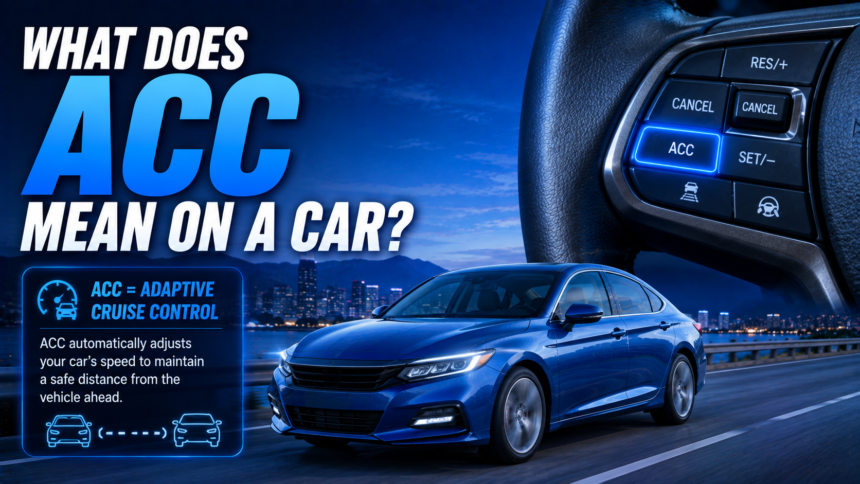
If you’ve spotted the letters “ACC” on your dashboard, in your owner’s manual, or on a window sticker at the dealership, you’re probably asking: what does ACC mean on a car? The short answer is that ACC stands for Adaptive Cruise Control, a driver-assistance feature that automatically speeds up, slows down, and maintains a set following distance from the vehicle ahead of you. Unlike traditional cruise control, which only holds a fixed speed, ACC actively reacts to the traffic around you.
- What Does ACC Stand For in a Car?
- How Adaptive Cruise Control Works
- ACC vs. Standard Cruise Control: What’s the Difference?
- What Automakers Call ACC (It’s Not Always “ACC”)
- How to Turn On Adaptive Cruise Control (Step-by-Step)
- Benefits of Adaptive Cruise Control
- Limitations and Safety Caveats You Need to Know
- Why Is My ACC Light On or Not Working?
- Is Adaptive Cruise Control Worth Having?
- Frequently Asked Questions
- Final Thoughts
- Related Articles
This guide breaks down exactly what ACC does, how it works under the hood, how it differs from regular cruise control, what it’s called on different car brands, and how to use it safely — including the limitations every driver should know before relying on it.
What Does ACC Stand For in a Car?
ACC stands for Adaptive Cruise Control. It’s also sometimes called dynamic cruise control, intelligent cruise control, or radar cruise control, depending on the automaker. All of these terms describe the same core idea: a system that uses sensors to “see” the vehicle ahead of you and automatically adjusts your speed to keep a safe, consistent gap.
Think of it as an evolution of standard cruise control. A regular cruise control system is essentially a “dumb” speed holder — set it to 65 mph, and it stays at 65 mph no matter what’s happening around you. ACC is smarter. It still lets you set a target speed, but it will slow your car down if traffic ahead slows down, then speed back up to your target once the road clears.
How Adaptive Cruise Control Works
ACC relies on a combination of onboard sensors, radar, and sometimes cameras or lidar to monitor the road ahead. Here’s the general process:
- Detection: Radar sensors (usually mounted in the front grille or bumper) and, in many newer vehicles, a forward-facing camera continuously scan the road ahead for other vehicles.
- Distance and speed calculation: The system calculates how far away the vehicle in front is and how fast it’s traveling relative to your car.
- Automatic adjustment: Based on that data, your car’s computer applies the throttle or the brakes to maintain the following distance or time gap you’ve selected — usually adjustable in several increments, from close to far.
- Resuming speed: Once the vehicle ahead moves out of your lane, speeds up, or exits, your car automatically accelerates back to your original set speed.
Most systems let you activate and adjust ACC using buttons on the steering wheel, similar to standard cruise control. You’ll typically see a “SET” or “RES” button to set or resume your target speed, along with a separate control to adjust the following distance.
Many modern versions include a feature often called Low-Speed Follow or Stop-and-Go, which allows the car to come to a complete stop in traffic and then resume moving on its own (or with a tap of the accelerator or a steering wheel button) once traffic starts moving again. This is especially useful in heavy highway congestion.
ACC vs. Standard Cruise Control: What’s the Difference?
This is one of the most common points of confusion, and it’s worth spelling out clearly:
| Feature | Standard Cruise Control | Adaptive Cruise Control (ACC) |
|---|---|---|
| Maintains a set speed | Yes | Yes |
| Reacts to traffic ahead | No | Yes |
| Automatically brakes | No | Yes, within system limits |
| Automatically re-accelerates | No | Yes |
| Works in stop-and-go traffic | No | Only with Low-Speed Follow versions |
| Requires driver to manually adjust speed for traffic | Yes | No, within system limits |
In short: standard cruise control manages your speed. ACC manages your speed and your distance from the car ahead, making it a genuine driver-assistance feature rather than just a convenience tool.
What Automakers Call ACC (It’s Not Always “ACC”)
While “Adaptive Cruise Control” is the generic industry term, many manufacturers brand it differently. If you’re shopping for a used or new car, you may see it listed under names like:
- Toyota/Lexus: Dynamic Radar Cruise Control (DRCC)
- Honda/Acura: Adaptive Cruise Control (ACC), often part of Honda Sensing
- Ford: Adaptive Cruise Control with Stop-and-Go
- GM (Chevrolet, GMC, Cadillac, Buick): Adaptive Cruise Control, or Super Cruise on select models
- Nissan/Infiniti: Intelligent Cruise Control (ICC)
- Subaru: Adaptive Cruise Control, part of EyeSight
- BMW: Active Cruise Control
- Mercedes-Benz: Distronic or Distronic Plus
- Hyundai/Kia: Smart Cruise Control (SCC)
- Volkswagen/Audi: Adaptive Cruise Assist / Adaptive Cruise Control
Functionally, these all do roughly the same job — the branding just varies by manufacturer.
How to Turn On Adaptive Cruise Control (Step-by-Step)
While exact button layouts vary by make and model, the general process looks like this:
- Activate the system. Press the main cruise control or ACC button, usually located on the steering wheel. This “arms” the system without setting a speed yet.
- Set your speed. Accelerate to your desired speed and press “SET,” or use the +/- buttons to dial in a target speed directly.
- Choose your following distance. Most systems offer 3–4 gap settings, from close to far. Tap the distance button to cycle through them — a longer gap is generally safer, especially at higher speeds.
- Let the system take over. Your car will now accelerate, brake, and maintain distance automatically within its speed range.
- Resume after braking. If you tap the brake pedal, ACC disengages. Press “RES” (resume) to pick back up at your previous set speed once it’s safe.
Always check your owner’s manual for your specific vehicle’s controls and terminology, since layouts differ between brands and even between trim levels.
Benefits of Adaptive Cruise Control
- Reduced driver fatigue. ACC handles constant speed adjustments on long highway drives, so you don’t have to ride the accelerator and brake pedal for hours.
- Smoother traffic flow. Because ACC reacts more consistently and quickly than most human drivers, it can help reduce the “accordion effect” that causes phantom traffic jams.
- Improved safety margins. By automatically maintaining a following distance, ACC helps reduce the risk of rear-end collisions caused by following too closely or reacting too late.
- Better fuel efficiency. Smoother acceleration and braking patterns tend to use less fuel than constant manual speed adjustments.
- Foundation for advanced driver assistance. ACC is often bundled with lane-keeping assist and automatic emergency braking as part of a broader driver-assistance suite, giving you a more complete safety net.
Limitations and Safety Caveats You Need to Know
This is where a lot of drivers get overconfident, and it’s important to be direct about it: ACC is not self-driving technology. It’s a driver-assistance feature, not a replacement for an attentive driver. Keep the following limitations in mind:
- Weather and visibility matter. Heavy rain, snow, fog, or a dirty sensor/camera can reduce ACC’s ability to detect vehicles accurately, and some systems will disable themselves in poor conditions.
- It may struggle with sudden cut-ins. If another vehicle merges sharply into your lane at close range, ACC may not react quickly enough — you should always be ready to brake manually.
- It’s designed mainly for highway-type driving. Most systems are optimized for higher, steadier speeds and gentle curves, not for tight city streets or sharp turns.
- It won’t stop for stationary objects in all cases. Some radar-only systems have historically had difficulty detecting fully stopped vehicles, especially at higher speeds — this is one reason automakers pair ACC with forward collision warning and automatic emergency braking.
- You must stay engaged. Most vehicles require your hands to remain on or near the wheel and will alert you (or eventually disengage the system) if they detect prolonged inattention.
Bottom line: use ACC as a helpful assistant, not an autopilot.
Why Is My ACC Light On or Not Working?
If your ACC light comes on unexpectedly or the system won’t engage, a few common culprits include:
- A blocked or dirty sensor. Mud, snow, ice, or even a heavy layer of dirt over the front radar or camera can disable the system until it’s cleaned.
- Low visibility conditions. Heavy fog, rain, or glare can temporarily deactivate ACC as a safety precaution.
- A recent windshield replacement. If your car uses a camera mounted near the rearview mirror, an improperly calibrated windshield replacement can cause ACC-related warnings.
- A genuine sensor or system fault. If the issue persists after cleaning the sensors and driving in clear conditions, it’s worth having the system diagnosed by a dealer or qualified technician — this is often a fixable sensor alignment issue rather than a major repair.
Is Adaptive Cruise Control Worth Having?
For most drivers who spend meaningful time on highways or in stop-and-go commuter traffic, ACC is one of the more genuinely useful driver-assistance features available today. It’s less of a “gimmick” feature and more of a practical, everyday convenience that also improves safety margins.
If you’re comparing trims or shopping for a used vehicle, it’s worth checking whether ACC is standard or an optional package, since pricing and availability vary widely by brand and trim level — sometimes by a few hundred dollars, other times bundled into a larger technology package worth over a thousand.
Frequently Asked Questions
What does ACC mean on a car dashboard? On a dashboard, ACC refers to Adaptive Cruise Control — the system that’s currently active, showing your set speed and following distance to the vehicle ahead.
Is ACC the same as self-driving? No. ACC only manages acceleration, braking, and following distance. It does not steer for you (unless combined with a separate lane-centering feature) and still requires full driver attention.
Does ACC work in stop-and-go traffic? Only if your vehicle has Low-Speed Follow or Stop-and-Go functionality. Basic ACC systems may disengage below a certain speed threshold.
Can I use ACC in the rain or snow? You can, but performance may be reduced, and some systems will automatically disable ACC in heavy precipitation or when sensors are obstructed.
Does ACC save gas? Generally, yes. By smoothing out acceleration and braking, ACC tends to be more fuel-efficient than constant manual speed adjustments, especially in steady highway driving.
Is ACC standard on most new cars? It varies by brand and trim. Many mainstream automakers now offer ACC as standard equipment on mid-range trims and above, while it remains an optional package on some base models.
Final Thoughts
So, what does ACC mean on a car? It’s Adaptive Cruise Control — a driver-assistance system that goes beyond traditional cruise control by automatically adjusting your speed and following distance based on the traffic around you. It can reduce driver fatigue, smooth out highway commutes, and add a meaningful layer of safety, but it’s not a substitute for attentive driving, and it has real limitations in poor weather or sudden traffic situations.
If you’re shopping for a new or used vehicle, take the time to test-drive the ACC system yourself, ask your dealer whether it’s standard or optional on your trim, and read your owner’s manual to understand exactly how your specific system behaves. A little hands-on familiarity goes a long way toward using this feature safely and getting the most out of it on every drive.
Related Articles
How Many Miles Does a Tesla Get? Full 2026 Range Guide by Model
What Does Dual Motor Mean on a Tesla? Complete Guide
How to Turn Off Tesla Location Sharing: Complete Step-by-Step Guide
What SUV Has LY7 Engine? Complete Guide, Specs & Buying Tips